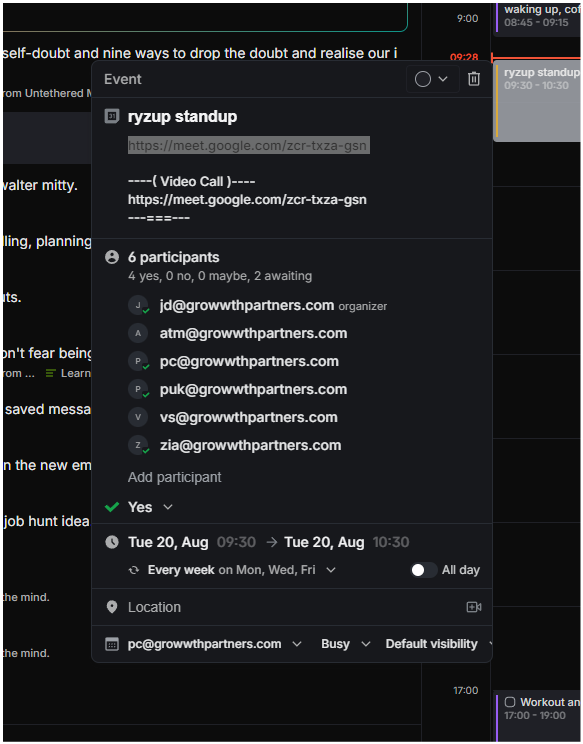
Hi @Preetham , If it is a google meet the link to join the google meet should be activated here.
You can not only click the button, but you can use ‘Command + J’ to actually join the meeting with shortcut.
The question is…. Wonder why your event does not have activated google meet link.
@Preetham Do you have all your events like this? (events that have google meet) or is it this specific event?
Preetham
•
Aug 20, 2024
what you shared here works when you create a goggle meet event in your calender ( pls also add other options like other providers, maybe try your own like — jitsi) anyway, coming back to it, when you already have events others created, there is copying links or join button.
tldr ; the button shows up when you create the event, but not when others have invited you to a meeting.
Ian Corvin
•
Aug 20, 2024
That’s not my experience. I have the button for all meetings that othersr have created and invited me to.
Dan
Team•
Aug 27, 2024
Hi, I just had my teammate invite me from google calendar. And yes I am seeing the link within the OFFLIGHT.
But I guess there is user scenario which this happens. Can you tell me what other people have used to invite you? We will have a look into this.
And for the copying link to meet, we are thinking about right click UX regarding calendar.
Log in to comment and vote
Comments5
Dan
Nov 4, 2024
Updated this with GUI and some shortcuts.
Dan
Aug 20, 2024
Hi @Preetham , If it is a google meet the link to join the google meet should be activated here.
You can not only click the button, but you can use ‘Command + J’ to actually join the meeting with shortcut.
The question is…. Wonder why your event does not have activated google meet link.
@Preetham Do you have all your events like this? (events that have google meet) or is it this specific event?
Preetham
Aug 20, 2024
what you shared here works when you create a goggle meet event in your calender ( pls also add other options like other providers, maybe try your own like — jitsi) anyway, coming back to it, when you already have events others created, there is copying links or join button.
tldr ; the button shows up when you create the event, but not when others have invited you to a meeting.
Ian Corvin
Aug 20, 2024
That’s not my experience. I have the button for all meetings that othersr have created and invited me to.
Dan
Aug 27, 2024
Hi, I just had my teammate invite me from google calendar. And yes I am seeing the link within the OFFLIGHT.
But I guess there is user scenario which this happens. Can you tell me what other people have used to invite you? We will have a look into this.
And for the copying link to meet, we are thinking about right click UX regarding calendar.